GPU Integration
This page covers using Mango BoostX™ RoCE AI in GPU clusters: verifying GPU-to-GPU peer-to-peer (P2P) RDMA with perftest, and running multi-GPU / multi-node collective communication via RCCL or NCCL.
Most of the experimental results on this page were collected on a legacy RNIC platform. Performance numbers, bandwidth figures, and example outputs therefore reflect the legacy product and will be updated with Mango BoostX™ RoCE AI measurements in a future revision.
Introduction
Peer-to-Peer Data Transfer for GPU Communication
When transferring data between GPUs, traditional RDMA involves system memory as an intermediate buffer, introducing additional overhead. Peer-to-peer (P2P) data transfer solves this: it allows RDMA NICs to directly read from and write to GPU memory over PCIe, bypassing the host memory buffer entirely. This approach significantly reduces data transfer latency and improves overall system performance.
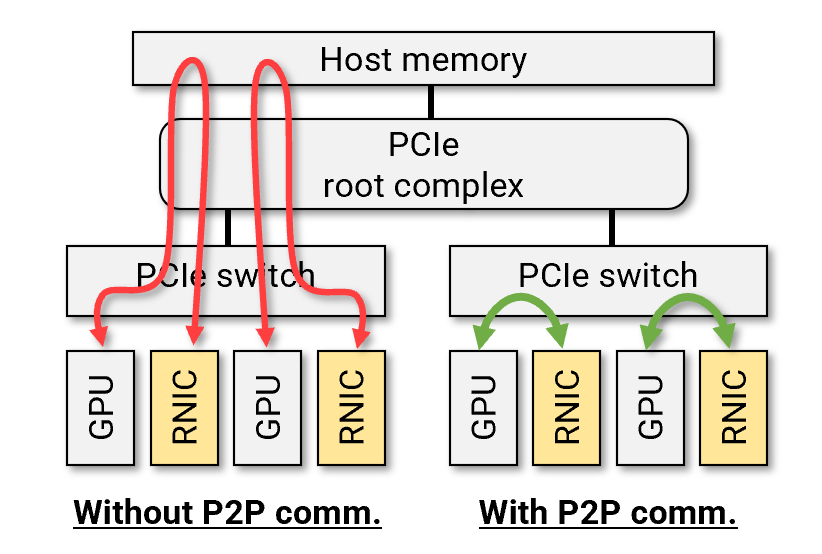
This technology is known as ROCmRDMA for AMD GPUs and GPUDirect RDMA for NVIDIA GPUs. Mango BoostX™ RoCE AI supports both, enabling efficient GPU cluster connectivity.
Prerequisites
Mango BoostX™ RoCE AI Setup
- Ensure the card is installed and working properly — see Hardware Setup and Software Setup.
GPU Setup
- Check that the GPU driver is installed and working properly.
- For NVIDIA GPUs, make sure the
nvidia-peermemmodule is loaded in addition to the GPU driver module.
PCIe Configuration
- Ensure the GPU and Mango BoostX™ RoCE AI card are under the same PCIe switch. If they are not, data will pass through the CPU's root complex, which can slow down performance.
- Make sure PCIe Access Control Service (ACS) on the PCIe switch is disabled. Depending on the platform, ACS may be disabled or enabled by default. If ACS is enabled, disable it using the script in Troubleshooting → Disabling ACS for P2P to allow peer-to-peer data transfer.
Verifying P2P with Perftest
perftest is the standard benchmarking tool for RDMA functionality and performance, and it also supports testing P2P direct GPU data transfer. By allocating a buffer in GPU memory and registering it as an MR on the RDMA NIC, perftest verifies direct data transfer between the RDMA NIC and GPU memory.
perftest supports RDMA Read, Write, and Send operations, with both latency and bandwidth tests. For general test options, refer to linux-rdma/perftest.
AMD GPU
Compile perftest with ROCm:
~$ sudo apt install libibumad-dev librdmacm-dev libibumad-dev
~$ git clone https://github.com/linux-rdma/perftest.git
~$ cd perftest
~$ ./autogen.sh
~$ ./configure --enable-rocm --with-rocm=/opt/rocm
~$ make
On Ubuntu 24.04 (Noble) and later, the dma-buf path is required: build perftest with --enable-rocm_dmabuf and run with --use_rocm_dmabuf. Without it, MR registration on GPU memory fails with Couldn't allocate MR with error=14.
The example below measures RDMA write bandwidth using GPU memory. Both sides issue the same command, but the client side additionally takes the server's IP address.
-dspecifies the RDMA device to use.--use_rocm=<gpu-id>specifies the GPU to use.
Ensure that the RDMA device and GPU are connected through the same PCIe switch.
(server) ~$ ./ib_write_bw -d mb_0 --use_rocm=0
(client) ~$ ./ib_write_bw -d mb_0 --use_rocm=0 100.0.10.1
Expected output
Using ROCm Device with ID: 0, Name: AMD Instinct MI210, PCI Bus ID: 0x43, GCN Arch: gfx90a:sramecc+:xnack-
allocated 131072 bytes of GPU buffer at 0x7f105ae00000
---------------------------------------------------------------------------------------
                    RDMA_Write BW Test
 Dual-port       : OFF          Device         : mb_0
 Number of qps   : 1            Transport type : IB
 Connection type : RC           Using SRQ      : OFF
 PCIe relax order: ON           Lock-free      : OFF
 ibv_wr* API     : OFF          Using DDP      : OFF
 TX depth        : 128
 CQ Moderation   : 1
 Mtu             : 1024[B]
 Link type       : Ethernet
 GID index       : 3
 Max inline data : 0[B]
 rdma_cm QPs     : OFF
 Use ROCm memory : ON
 Data ex. method : Ethernet
---------------------------------------------------------------------------------------
 local address: LID 0000 QPN 0x000d PSN 0x838f4b RKey 0x000a11 VAddr 0x007f105ae10000
 GID: 00:00:00:00:00:00:00:00:00:00:255:255:100:0:10:1
 remote address: LID 0000 QPN 0x000c PSN 0x6aad90 RKey 0x000908 VAddr 0x007f3526c10000
 GID: 00:00:00:00:00:00:00:00:00:00:255:255:100:0:10:2
---------------------------------------------------------------------------------------
 #bytes     #iterations    BW peak[MiB/sec]    BW average[MiB/sec]   MsgRate[Mpps]
Conflicting CPU frequency values detected: 2000.000000 != 3098.903000. CPU Frequency is not max.
 65536      5000             11044.74            11030.90                    0.170294
---------------------------------------------------------------------------------------
deallocating GPU buffer 0x7f105ae00000
Monitor the GPU's PCIe traffic using rocm-smi to confirm that the Mango BoostX™ RoCE AI card is reading and writing the GPU memory buffer registered as an MR:
~$ rocm-smi -b
============================ ROCm System Management Interface ============================
================================ Measured PCIe Bandwidth =================================
GPU[0]          : Estimated maximum PCIe bandwidth over the last second (MB/s): 11280.744
==========================================================================================
================================== End of ROCm SMI Log ===================================
NVIDIA GPU
Compile perftest with CUDA:
~$ sudo apt install libibumad-dev librdmacm-dev libibumad-dev
~$ git clone https://github.com/linux-rdma/perftest.git
~$ cd perftest
~$ ./autogen.sh
~$ ./configure CUDA_H_PATH=/usr/local/cuda/include/cuda.h
~$ make
-dspecifies the RDMA device to use.--use_cuda=<gpu-id>specifies the GPU to use.
Make sure the RDMA device and GPU are under the same PCIe switch.
(server) ~$ ./ib_write_bw -d mb_0 --use_cuda=0
(client) ~$ ./ib_write_bw -d mb_0 --use_cuda=0 100.0.10.1
Expected output
initializing CUDA
Listing all CUDA devices in system:
CUDA device 0: PCIe address is D1:00

Picking device No. 0
[pid = 8209, dev = 0] device name = [NVIDIA A100 80GB PCIe]
creating CUDA Ctx
making it the current CUDA Ctx
CUDA device integrated: 0
cuMemAlloc() of a 131072 bytes GPU buffer
allocated GPU buffer address at 00007f42df200000 pointer=0x7f42df200000
---------------------------------------------------------------------------------------
                    RDMA_Write BW Test
 Dual-port       : OFF          Device         : mb_0
 Number of qps   : 1            Transport type : IB
 Connection type : RC           Using SRQ      : OFF
 PCIe relax order: ON           Lock-free      : OFF
 ibv_wr* API     : OFF          Using DDP      : OFF
 CQ Moderation   : 1
 Mtu             : 1024[B]
 Link type       : Ethernet
 GID index       : 3
 Max inline data : 0[B]
 rdma_cm QPs     : OFF
 Data ex. method : Ethernet
---------------------------------------------------------------------------------------
 local address: LID 0000 QPN 0x0005 PSN 0xe2ed2b RKey 0x000322 VAddr 0x007f42df210000
 GID: 00:00:00:00:00:00:00:00:00:00:255:255:100:00:10:01
 remote address: LID 0000 QPN 0x0005 PSN 0x8f5b8c RKey 0x000245 VAddr 0x007f19db210000
 GID: 00:00:00:00:00:00:00:00:00:00:255:255:100:00:10:02
---------------------------------------------------------------------------------------
 #bytes     #iterations    BW peak[MiB/sec]    BW average[MiB/sec]   MsgRate[Mpps]
 65536      5000             10841.37            10621.97                    0.169951
---------------------------------------------------------------------------------------
deallocating GPU buffer 00007f42df200000
destroying current CUDA Ctx
Monitor the GPU's PCIe traffic using nvidia-smi:
~$ nvidia-smi dmon -s t
# gpu  rxpci  txpci
# Idx   MB/s   MB/s
    0  13957      0
    0  13963      0
    0  13692      0
    0  13983      0
    ...
Collective Communication (RCCL / NCCL)
The ROCm Collective Communication Library (RCCL) and NVIDIA Collective Communication Library (NCCL) are collective communication libraries designed for high-performance multi-GPU and multi-node AI workloads. NCCL, developed by NVIDIA, provides optimized communication primitives for deep learning frameworks, enabling efficient all-reduce, broadcast, and other collective operations across GPUs. RCCL, AMD's equivalent, offers similar functionality optimized for AMD GPUs. Both libraries leverage high-speed interconnects like NVLink, Infinity Fabric, PCIe, and RDMA to maximize communication efficiency, making them essential for distributed training and large-scale AI applications.
This section uses AMD GPUs and rccl-tests to evaluate the performance and correctness of RCCL operations. NVIDIA GPUs and NCCL can be tested in a similar way.
Example Server Setup
The example setup consists of two AMD GPU servers, each with 8 MI300X connected via Infinity Fabric.
~$ lspci | grep MI300X
05:00.0 Processing accelerators: Advanced Micro Devices, Inc. [AMD/ATI] Aqua Vanjaram [Instinct MI300X]
26:00.0 Processing accelerators: Advanced Micro Devices, Inc. [AMD/ATI] Aqua Vanjaram [Instinct MI300X]
46:00.0 Processing accelerators: Advanced Micro Devices, Inc. [AMD/ATI] Aqua Vanjaram [Instinct MI300X]
65:00.0 Processing accelerators: Advanced Micro Devices, Inc. [AMD/ATI] Aqua Vanjaram [Instinct MI300X]
85:00.0 Processing accelerators: Advanced Micro Devices, Inc. [AMD/ATI] Aqua Vanjaram [Instinct MI300X]
a6:00.0 Processing accelerators: Advanced Micro Devices, Inc. [AMD/ATI] Aqua Vanjaram [Instinct MI300X]
c6:00.0 Processing accelerators: Advanced Micro Devices, Inc. [AMD/ATI] Aqua Vanjaram [Instinct MI300X]
e5:00.0 Processing accelerators: Advanced Micro Devices, Inc. [AMD/ATI] Aqua Vanjaram [Instinct MI300X]
~$ dpkg -l | grep rocm
ii  rocm                    6.3.0.60300-39~24.04          amd64    Radeon Open Compute (ROCm) software stack meta package
Each server is equipped with 8 Mango BoostX™ RoCE AI cards, for a total of 16 RDMA interfaces. For simplicity, only one port of each card is enabled in this test, with one port allocated per GPU. Aggregated RDMA bandwidth is therefore 800 Gbps.
~$ rdma link
link mb_0/1  state ACTIVE physical_state LINK_UP  netdev ens11np0
link mb_1/1  state DOWN   physical_state DISABLED netdev ens12np0
link mb_2/1  state ACTIVE physical_state LINK_UP  netdev ens21np0
link mb_3/1  state DOWN   physical_state DISABLED netdev ens22np0
link mb_4/1  state ACTIVE physical_state LINK_UP  netdev ens31np0
link mb_5/1  state DOWN   physical_state DISABLED netdev ens32np0
link mb_6/1  state ACTIVE physical_state LINK_UP  netdev ens41np0
link mb_7/1  state DOWN   physical_state DISABLED netdev ens42np0
link mb_8/1  state ACTIVE physical_state LINK_UP  netdev ens51np0
link mb_9/1  state DOWN   physical_state DISABLED netdev ens52np0
link mb_10/1 state ACTIVE physical_state LINK_UP  netdev ens61np0
link mb_11/1 state DOWN   physical_state DISABLED netdev ens62np0
link mb_12/1 state ACTIVE physical_state LINK_UP  netdev ens71np0
link mb_13/1 state DOWN   physical_state DISABLED netdev ens72np0
link mb_14/1 state ACTIVE physical_state LINK_UP  netdev ens81np0
link mb_15/1 state DOWN   physical_state DISABLED netdev ens82np0
Building rccl-tests
rccl-tests is a test tool for verifying the performance and functionality of RCCL in the AMD ROCm environment. It requires UCX/OpenMPI to launch processes on multiple nodes.
Build UCX for MPI
For more information on UCX, refer to the official UCX documentation.
~$ git clone https://github.com/openucx/ucx.git ucx
~$ cd ucx && ./autogen.sh
~$ mkdir build && cd build && ../configure --prefix=<ucx-install-path> --without-go
~$ make -j32 && make install

# Check UCX version
~$ <ucx-install-path>/bin/ucx_info -v
# Library version: 1.19.0
# Library path: <ucx-install-path>/lib/libucs.so.0
# API headers version: 1.19.0
# Git branch 'master', revision 837a96e
# Configured with: --prefix=<ucx-install-path> --without-go
Build OpenMPI
To compile OpenMPI with UCX:
~$ wget https://download.open-mpi.org/release/open-mpi/v5.0/openmpi-5.0.5.tar.gz
~$ tar -xvzf openmpi-5.0.5.tar.gz
~$ cd openmpi-5.0.5
~$ mkdir build-ucx && cd build-ucx
~$ ../configure --prefix=<ompi-install-path> --with-ucx=<ucx-install-path>
~$ make -j 32 && make install

# Check openMPI version
~$ <ompi-install-path>/bin/mpirun -V
mpirun (Open MPI) 5.0.5

Report bugs to http://www.open-mpi.org/community/help/
Build rccl-tests
Compile rccl-tests with OpenMPI. The default RCCL path is /opt/rocm/rccl.
~$ git clone https://github.com/ROCm/rccl-tests.git
~$ cd rccl-tests
~$ ./install.sh --mpi 1 --mpi_home=<ompi-install-path> --rccl_home=<rccl-path>
~$ ls ./build/*perf
./build/all_gather_perf      ./build/alltoall_perf      ./build/broadcast_perf  ./build/reduce_perf
./build/scatter_perf         ./build/all_reduce_perf    ./build/alltoallv_perf  ./build/gather_perf
./build/reduce_scatter_perf  ./build/sendrecv_perf
Single Node Test without RDMA
To verify the installation, start with a single-node test where GPUs communicate exclusively through Infinity Fabric.
Run command
~$ <rccl-tests-install-path>/build/all_reduce_perf -o sum -b 1G -e 16G -f 2 -g 8 2> /dev/null
rccl-tests provides tests for various collective communication primitives. This guide tests allreduce, the most widely used operation in distributed AI training.
-ospecifies the reduction operation to perform.-bsets the minimum size of the test data.-esets the maximum size of the test data.-fdetermines the step factor (multiplication factor between sizes).-gspecifies the number of GPUs each thread will use.
Since this runs a single process with the default thread count of 1, the process uses 8 GPUs for testing.
For more details on general test options, refer to ROCm/rccl-tests.
Expected output
Check the busbw column for the aggregated bandwidth provided by hardware. In the single-node test, busbw is intra-node data transfer bandwidth of Infinity Fabric. Zeros in the #wrong columns indicate no data corruption.
# nThread 1 nGpus 8 minBytes 1073741824 maxBytes 17179869184 step: 2(factor) warmup iters: 5 iters: 20 agg iters: 1 validation: 1 graph: 0
#
rccl-tests: Version develop:ae3e635
# Using devices
#   Rank  0 Pid 962969 on        ai1 device  0 [0000:05:00.0] AMD Instinct MI300X
#   Rank  1 Pid 962969 on        ai1 device  1 [0000:26:00.0] AMD Instinct MI300X
#   Rank  2 Pid 962969 on        ai1 device  2 [0000:46:00.0] AMD Instinct MI300X
#   Rank  3 Pid 962969 on        ai1 device  3 [0000:65:00.0] AMD Instinct MI300X
#   Rank  4 Pid 962969 on        ai1 device  4 [0000:85:00.0] AMD Instinct MI300X
#   Rank  5 Pid 962969 on        ai1 device  5 [0000:a6:00.0] AMD Instinct MI300X
#   Rank  6 Pid 962969 on        ai1 device  6 [0000:c6:00.0] AMD Instinct MI300X
#   Rank  7 Pid 962969 on        ai1 device  7 [0000:e5:00.0] AMD Instinct MI300X
#
#                                                              out-of-place                       in-place
#       size         count      type   redop    root     time   algbw   busbw #wrong     time   algbw   busbw #wrong
#        (B)    (elements)                               (us)  (GB/s)  (GB/s)            (us)  (GB/s)  (GB/s)
  1073741824     268435456     float     sum      -1   5790.9  185.42  324.49      0   5801.2  185.09  323.91      0
  2147483648     536870912     float     sum      -1    11502  186.71  326.74      0    11525  186.33  326.08      0
  4294967296    1073741824     float     sum      -1    22958  187.08  327.38      0    22996  186.77  326.85      0
  8589934592    2147483648     float     sum      -1    45834  187.41  327.97      0    45898  187.15  327.51      0
 17179869184    4294967296     float     sum      -1    91415  187.93  328.88      0    91458  187.84  328.73      0
# Errors with asterisks indicate errors that have exceeded the maximum threshold.
# Out of bounds values : 0 OK
# Avg bus bandwidth    : 326.854
Single Node Test with RDMA
Setting RCCL_ENABLE_INTRANET=1 allows RCCL to use RDMA NICs for collective communication, even on a single node.
Run command
The test options are the same as the single-node test without RDMA.
~$ export RCCL_ENABLE_INTRANET=1 && \
   <rccl-tests-install-path>/build/all_reduce_perf -o sum -b 1G -e 16G -f 2 -g 8 2> /dev/null
Expected output
busbw is now bound by the RDMA data transfer bandwidth of the RDMA NICs. With eight 100Gbps interfaces, the total aggregated bandwidth reaches 800 Gbps.
# nThread 1 nGpus 8 minBytes 1073741824 maxBytes 17179869184 step: 2(factor) warmup iters: 5 iters: 20 agg iters: 1 validation: 1 graph: 0
#
rccl-tests: Version develop:ae3e635
# Using devices
#   Rank  0 Pid 3253237 on        ai1 device  0 [0000:05:00.0] AMD Instinct MI300X
#   Rank  1 Pid 3253237 on        ai1 device  1 [0000:26:00.0] AMD Instinct MI300X
#   Rank  2 Pid 3253237 on        ai1 device  2 [0000:46:00.0] AMD Instinct MI300X
#   Rank  3 Pid 3253237 on        ai1 device  3 [0000:65:00.0] AMD Instinct MI300X
#   Rank  4 Pid 3253237 on        ai1 device  4 [0000:85:00.0] AMD Instinct MI300X
#   Rank  5 Pid 3253237 on        ai1 device  5 [0000:a6:00.0] AMD Instinct MI300X
#   Rank  6 Pid 3253237 on        ai1 device  6 [0000:c6:00.0] AMD Instinct MI300X
#   Rank  7 Pid 3253237 on        ai1 device  7 [0000:e5:00.0] AMD Instinct MI300X
#
#                                                              out-of-place                       in-place
#       size         count      type   redop    root     time   algbw   busbw #wrong     time   algbw   busbw #wrong
#        (B)    (elements)                               (us)  (GB/s)  (GB/s)            (us)  (GB/s)  (GB/s)
  1073741824     268435456     float     sum      -1    20656   51.98   90.97      0    20854   51.49   90.11      0
  2147483648     536870912     float     sum      -1    41652   51.56   90.23      0    41490   51.76   90.58      0
  4294967296    1073741824     float     sum      -1    82365   52.15   91.25      0    82435   52.10   91.18      0
  8589934592    2147483648     float     sum      -1   164758   52.14   91.24      0   164466   52.23   91.40      0
 17179869184    4294967296     float     sum      -1   328864   52.24   91.42      0   328329   52.33   91.57      0
# Errors with asterisks indicate errors that have exceeded the maximum threshold.
# Out of bounds values : 0 OK
# Avg bus bandwidth    : 90.994
Multi Node Test
For multi-node testing, rccl-tests processes must be executed on multiple nodes. Using OpenMPI, you can launch rccl-tests processes on all nodes from a single host and collect the results. The example below tests with two symmetric servers.
Run command
~$ cat rccltests_2node.sh
#!/bin/bash

NUM_PROCESS=16
MANAGE_IFACE=ens50f0
IP_NODE1=ai1
IP_NODE2=ai2

<ompi-install-path>/bin/mpirun \
    --mca btl tcp,self,vader --mca pml ob1 \
    --mca btl_tcp_if_include $MANAGE_IFACE \
    -np $NUM_PROCESS -host $IP_NODE1:8,$IP_NODE2:8 \
    -x NCCL_SOCKET_IFNAME=$MANAGE_IFACE \
    <rccl-tests-install-path>/build/all_reduce_perf -o sum -b 1G -e 16G -f 2 -g 1
~$ ./rccltests_2node.sh
NUM_PROCESS— total number of processes to execute.- With 16 GPUs across two nodes, setting
NUM_PROCESS=16and-g 1ensures all GPUs are used. - An alternative is
-g 8andNUM_PROCESS=2. However, therccl-testsmanual recommends the former for more accurate performance measurement.
- With 16 GPUs across two nodes, setting
MANAGE_IFACE— the management interface of the node.IP_NODE<i>— the management IP of each node. Ensure passwordless SSH is configured for these IPs.
Expected output
busbw is now bound by the inter-node data transfer bandwidth of the RDMA NICs. With eight 100Gbps interfaces, the total aggregated bandwidth reaches 800 Gbps.
# nThread 1 nGpus 1 minBytes 1073741824 maxBytes 17179869184 step: 2(factor) warmup iters: 5 iters: 20 agg iters: 1 validation: 1 graph: 0
#
rccl-tests: Version develop:ae3e635
# Using devices
#   Rank  0 Pid 954281 on        ai1 device  0 [0000:05:00.0] AMD Instinct MI300X
#   Rank  1 Pid 954282 on        ai1 device  1 [0000:26:00.0] AMD Instinct MI300X
#   ...
#   Rank 15 Pid 534334 on        ai2 device  7 [0000:e5:00.0] AMD Instinct MI300X
#
#                                                              out-of-place                       in-place
#       size         count      type   redop    root     time   algbw   busbw #wrong     time   algbw   busbw #wrong
#        (B)    (elements)                               (us)  (GB/s)  (GB/s)            (us)  (GB/s)  (GB/s)
  1073741824     268435456     float     sum      -1    21962   48.89   91.67      0    21965   48.88   91.66      0
  2147483648     536870912     float     sum      -1    43771   49.06   91.99      0    43832   48.99   91.86      0
  4294967296    1073741824     float     sum      -1    87414   49.13   92.13      0    87402   49.14   92.14      0
  8589934592    2147483648     float     sum      -1   174897   49.11   92.09      0   174931   49.10   92.07      0
 17179869184    4294967296     float     sum      -1   350016   49.08   92.03      0   349883   49.10   92.07      0
# Errors with asterisks indicate errors that have exceeded the maximum threshold.
# Out of bounds values : 0 OK
# Avg bus bandwidth    : 91.9699
Environment Variables
The library can be configured by setting environment variables. RCCL and NCCL share the same configuration variables. This guide highlights a few key ones; for the complete list, refer to the official NCCL documentation.
NCCL_DEBUG
Controls the amount of debug information displayed by the library. Setting NCCL_DEBUG=INFO provides more detailed execution information.
NCCL_NET_GDR_LEVEL
Controls when P2P data transfer is used between the GPU and RDMA NIC.
Values range from LOC (always disabled) to SYS (always enabled), with intermediate levels (PIX, PXB, PHB) adjusting behavior based on system configuration. Refer to the official documentation for details. If unset, the library automatically selects the optimal value based on system and environment.
If P2P is enabled, lines containing NET/IB/*/GDRDMA will be displayed (with NCCL_DEBUG=INFO):
~$ ./rccltests_2node.sh  | grep GDRDMA
ai1:959022:959070 [3] NCCL INFO Channel 03/0 : 11[65000] -> 3[65000] [receive] via NET/IB/3/GDRDMA comm 0x25f4480 nRanks 16
ai1:959023:959073 [4] NCCL INFO Channel 04/0 : 12[85000] -> 4[85000] [receive] via NET/IB/4/GDRDMA comm 0x134d3b0 nRanks 16
...
If P2P is not enabled, the output will show only NET/IB/*:
~$ ./rccltests_2node.sh  | grep "via NET/IB"
ai1:960758:960815 [1] NCCL INFO Channel 00/0 : 1[26000] -> 8[5000] [send] via NET/IB/0 comm 0x2975fe0 nRanks 16
ai1:960758:960815 [1] NCCL INFO Channel 01/0 : 1[26000] -> 8[5000] [send] via NET/IB/2 comm 0x2975fe0 nRanks 16
...